Hud Manager CS 1.6
Hud Manager for Counter-Srike 1.6
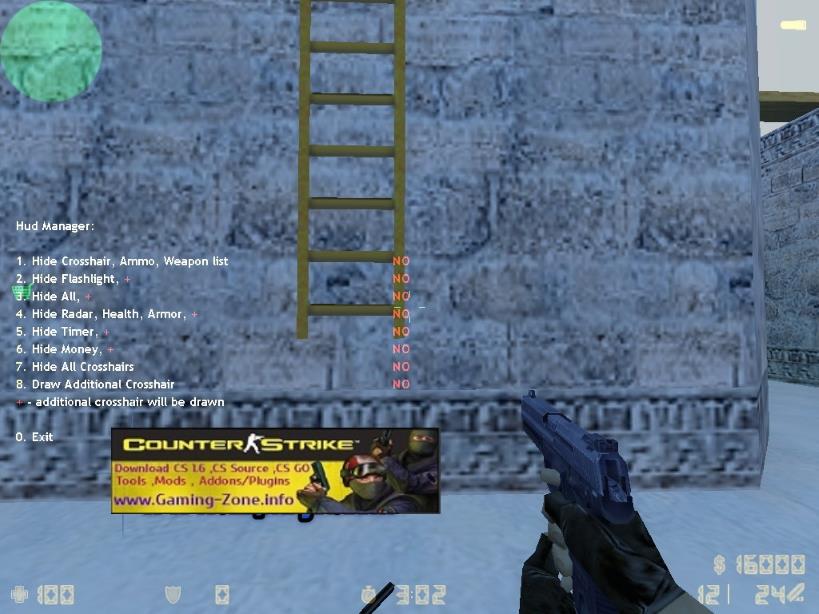
HUD manager plugin helps to remove all the features seen in the sample image, such as radar, money, time crosshair, etc. on the players’ screens.
To give an example, for example, I do not want the time to appear on my screen. I open the menu by typing say /hud . I delete the time from the screen by selecting number 5. To bring it back again, you press the number 5 again.
.
Player cmds say /hud
.

.
Installation:
- 1. File “hud_manager.sma” into /cstrike/addons/amxmodx/scripting folder.
- 2. File “hud_manager.amxx” into /cstrike/addons/amxmodx/plugins folder.
- 3. Add the text “hud_manager.amxx” to the bottom line of the /cstrike/addons/amxmodx/configs/plugins.ini file.
- 4. Finally, res the server or change the map.!
Related Posts:Plugin semiclip (pass through your own) for cs 1.6PUBLIC PLUGINSPlugin Reload Status counter-strike 1.6PUBLIC PLUGINSTetris PluginPUBLIC PLUGINSAmx Rocket PluginPUBLIC PLUGINSServer Information PluginPUBLIC PLUGINSShow Equipment Sprite for CS 1.6PUBLIC PLUGINSAmxx Simple Admin Chat Color v1-v2PUBLIC PLUGINSAmxx Lastround V2PUBLIC PLUGINSPlugin "Erotic Bomb 0.4 - Dancer C4" for CS 1.6PUBLIC PLUGINS
Plugin semiclip (pass through your own) for cs 1.6
PUBLIC PLUGINS
Plugin Reload Status counter-strike 1.6
PUBLIC PLUGINS
Tetris Plugin
PUBLIC PLUGINS
Amx Rocket Plugin
PUBLIC PLUGINS
Server Information Plugin
PUBLIC PLUGINS
Show Equipment Sprite for CS 1.6
PUBLIC PLUGINS
Amxx Simple Admin Chat Color v1-v2
PUBLIC PLUGINS
Amxx Lastround V2
PUBLIC PLUGINS
Plugin "Erotic Bomb 0.4 - Dancer C4" for CS 1.6
PUBLIC PLUGINS
About The Author